Taking the result into Lightroom, Photoshop or PixInsight
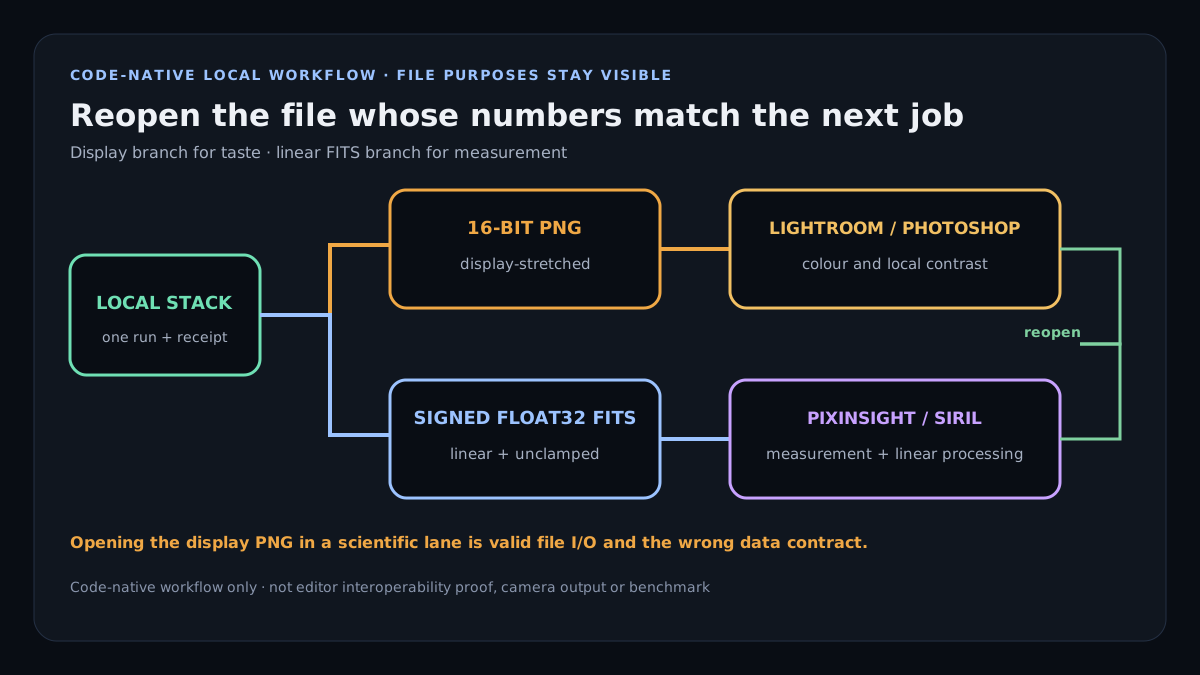
Star Trail Stacker writes two files from one run: a 16-bit PNG that has already had a display transform applied, for Lightroom and Photoshop, and a signed 32-bit FITS that has not, for PixInsight and Siril — and opening the first one where the second belongs is the mistake that quietly ruins an integration.
On this page
Two files, and they are not two copies of the same thing
| File | What it holds | Where it belongs |
|---|---|---|
| 16-bit PNG | The integration with a display transform already applied once — black point, white point and the curve that makes it look like a photograph on a screen. | Lightroom, Photoshop, Affinity, Capture One. Anywhere you would open a finished frame. |
| 32-bit FITS | The integration itself. Signed, so a pixel below the sky background stays below it instead of being clipped at zero, and unclamped, so a bright star keeps its value instead of being flattened to white. | PixInsight, Siril, AstroPixelProcessor, astropy. Anywhere the arithmetic is going to continue. |
The mistake, and why nothing warns you about it
Open the PNG in PixInsight and it will load, and it will look right, and every measurement you make on it afterwards will be wrong. A display transform is not reversible: the curve that made the faint end visible also compressed it, so the difference between two dim pixels no longer means what it meant. Photometry on a display-transformed image measures the curve as much as the sky.
Nothing in either program warns you, because a 16-bit PNG is a perfectly valid 16-bit PNG. The only thing that distinguishes them is knowing which one you asked for — which is why this tool writes both from the same run rather than making you choose at the start.
What the FITS header tells the next program
The export carries its own provenance in the header rather than leaving the next tool to guess: which method built it, how many frames went in, how many channels, whether the frames were registered, whether the values are signed and unclamped, and — if the frame was cropped to the region every frame covers — what the original dimensions were. A three-channel integration is written plane-major with the planes labelled R, G and B, which is what PixInsight and astropy both expect.
Before: what to feed it, and one number worth knowing
- RAW if you have it. The mosaic is kept rather than demosaiced, so the calibration and the stack happen on the sensor's own samples.
- Lossless if you do not. Measured on this site's own registration: JPEG costs about 1.3% of registration accuracy against a lossless source, and WebP costs 8.6%. Neither is fatal and the difference is free to avoid.
- Do not pre-stretch in Lightroom. A curve applied per frame before stacking is a different curve on each frame, and equalising the sky is precisely what this tool does for you.
- Darks and flats go in their own slots, not into the Lights. They are named roles and a calibration frame in the Lights is a named refusal rather than a silently darker picture.
After, in Lightroom or Photoshop
Import the PNG as you would any finished frame. It is already in sRGB and already stretched, so the work left is taste rather than repair: local contrast, colour, and whatever you want to do with the foreground. If the sky came out flatter than you expected, that is the equalised fold doing its job — every frame's sky was brought to a common level before the maximum, which is what stops one brightening cloud from winning the whole picture.
After, in PixInsight or Siril
Open the FITS. It is linear, so the first thing either program will want is a screen transfer function to see anything at all — that is expected and it changes only the display. Deconvolution, noise reduction and photometry all belong here, on the unstretched data, before any permanent stretch.
If you are continuing a deep-sky integration, the frames were already registered and the result is already cropped to the region every frame covers, unless you turned that off. Registering it again against itself will do nothing useful.
Try it on your own night
Open the stacker Nothing is uploaded and nothing is installed; the frames are read in your browser.